Enterprise Chatbot Solutions: Integration First
78% of companies have already put conversational AI into at least one core function, and most of them still haven't solved the hard part. That's the part that...

78% of companies have already put conversational AI into at least one core function, and most of them still haven't solved the hard part. That's the part that actually matters. Enterprise chatbot integration is where promising demos go to die, or where they finally become useful systems that can read, write, route, and act across your business.
A few years back, you could get away with a chatbot that answered FAQs and looked busy. You can't now. According to Master of Code, 78% of companies are already using conversational AI in core workflows, and by 2026, 40% of enterprise applications will include task-specific AI agents, according to Chatbot.com. I'll show you why integration-first architecture, not model hype, decides whether your bot saves time or creates a new mess.
What Enterprise Chatbot Solutions Really Are
8:17 a.m., Monday, forced credential update went sideways, and about 40 people suddenly couldn't get into anything. Slack lit up. IT got buried. That's the moment a lot of “enterprise chatbots” get exposed. If the bot can calmly explain the password reset policy but can't actually trigger the reset in Okta or Active Directory, it's not helping. It's just talking nicely while the queue burns.
Plenty of companies still buy that version. You can see why. 78% of companies have already put conversational AI into at least one core function, according to Master of Code. Big number. Messy reality.
They talk. They search. They stall.
I think that's where the label gets abused. A polished chat interface sitting on top of documentation isn't an enterprise system. It's a prettier FAQ. Real enterprise chatbot solutions do something harder and way less glamorous: they connect to the systems your business already depends on and take action inside them.
Salesforce. ServiceNow. Workday. SAP. Active Directory. Your HRIS. Your ERP. That's the real job. Workativ says enterprise chatbots automate both customer-facing and internal employee interactions by connecting to systems like ITSM, CRM, and ERP so they can resolve issues and execute tasks. That's the difference right there — execution, not conversation.
Vendors blur that line all the time because “AI assistant” sounds slick and “integration project” sounds expensive. I'd argue the integration project is the product. Enterprise chatbot integration is what decides whether you've bought useful software or office decor.
The value shows up in systems of record integration. The bot has to securely read from and write to trusted business systems. In serious environments, that usually runs through a middleware layer. I've seen teams skip that because a direct connection looked faster in a demo. Three months later somebody adds ServiceNow, another team wants Workday in the same flow, finance asks for SAP data, security tightens controls, one API version changes, and now six fragile dependencies are hanging together with luck and late-night patching.
A workable chatbot integration architecture usually means APIs for core access, webhooks for updates, sometimes microservices for domain-specific actions, and in more mature setups an event-driven architecture so workflows stay responsive without wiring every system directly to every other one.
TeamDynamix lands on the same point from a different angle: enterprise deployments often need integration hubs or middleware to connect tools like Workday, HRIS platforms, Salesforce, and Active Directory so the chatbot can run action-centered workflows instead of just searching documents.
Enterprise chatbot security shows up fast once the bot can touch anything real. Employee records. Ticket updates. Identity systems. Permissions, audit trails, and data synchronization for chatbots aren't bonus features at that point. They're table stakes. We've written more about that in enterprise chatbot development security governance.
Ask blunt questions. What systems can it read from? What systems can it write to? How does it do both safely? If you hear vague answers, canned language, or a sales engineer saying “that's on the roadmap,” keep walking.
Why Enterprise Chatbots Fail Without Integration
Hot take: most enterprise chatbot demos are theater.

I’d argue the prettiest conversational layer is often the least interesting part of the whole system. If a bot sounds polished but can’t touch the tools your company actually runs on, it’s not an enterprise solution. It’s a well-spoken bystander.
I watched this happen on a project that chewed through six figures. The bot could apologize, clarify messy requests, and keep its tone calm when users got vague. In the demo, people loved it. Then someone asked it to raise the priority of a support ticket in ServiceNow. Dead stop. It could talk about the ticket like a veteran support rep. It just couldn’t change the ticket.
That’s the failure point. Not language first. Plumbing.
The usual obsession with phrasing is backwards. Enterprise teams keep grading bots on how human they sound, while the real question is whether they can pull live customer status from Salesforce, create or update incidents in Jira or ServiceNow, trigger approvals in Workday, and push events through webhooks or an event-driven setup without falling apart.
The spending numbers make this even stranger. Master of Code reported that 71% of business and tech leaders are investing in intelligent bots for customer experience initiatives. Seventy-one percent. That’s not cautious experimentation anymore. That’s budget with expectations attached. And yet plenty of those projects still get judged on wording before operational access, like execution can wait until phase two.
It can’t. For enterprise chatbot solutions, execution is the product.
ArticSledge makes the distinction clearly: enterprise tools aren’t consumer bots with better branding slapped on top. They need scale, bi-directional API integration with business systems, and workflow support across departments. HR doesn’t need the same actions as IT. Finance definitely doesn’t. Jam all of that into one giant block of logic and you get a brittle mess by Q2.
I’ve seen that version too. One company wired its bot directly into four systems with point-to-point connections because it was “faster for launch.” Classic mistake. Three months later, one API change broke two workflows and quietly corrupted ticket metadata for 1,200 requests before anyone noticed Monday morning at 8:43 a.m. Support spent half the day untangling records that looked valid until you traced them back system by system.
That’s why the boring architecture matters more than people want to admit: middleware between systems of record, microservices where actions need clean separation, and real data synchronization for chatbots so stale account data doesn’t turn confident answers into expensive mistakes.
This problem gets sharper as agent volume rises. Not softer. Chatbot.com says that by 2026, 40% of enterprise applications will include task-specific AI agents. More agents means more opportunities to write bad data faster, trigger the wrong workflow before a human catches it, and spread errors across connected systems in minutes instead of hours.
So stop starting with prompts. Start here instead.
Can it read? Not from yesterday’s export. From live systems of record like Salesforce and ServiceNow.
Can it write? Can it create, update, route, approve, and close work inside Jira, ServiceNow, Workday, and the rest of your stack?
Can it survive change? Is there an actual chatbot integration architecture behind it—middleware, service boundaries, event handling—or is it wired together like somebody built it at 11:52 p.m. before launch?
Can it act safely? Where does enterprise chatbot security show up in those flows? Permissions. Audit trails. Approval rules. Failure handling. The stuff people skip in demos and regret in production.
If you’re sorting through that right now, this breakdown on sap ai integration for enterprise complexity is worth a read.
Here’s the part people don’t expect: I’m not saying conversation quality doesn’t matter. It does. It just comes after something less glamorous and way more valuable—whether the bot can do real work safely inside the systems your team already depends on. If it can’t handle a random Tuesday at 9:17 a.m., with live data, permissions intact, and one messy user request from an annoyed employee, then all that elegant language was just set dressing.
Enterprise Chatbot Integration Architecture Patterns
$27 billion by 2030. That’s the chatbot market forecast Chatbot.com points to. I’ll be honest: numbers like that usually make me suspicious, not excited. Big forecasts are catnip for slides. They don’t explain why one enterprise bot quietly does its job for three years while another turns into a weird little outage factory by quarter two.
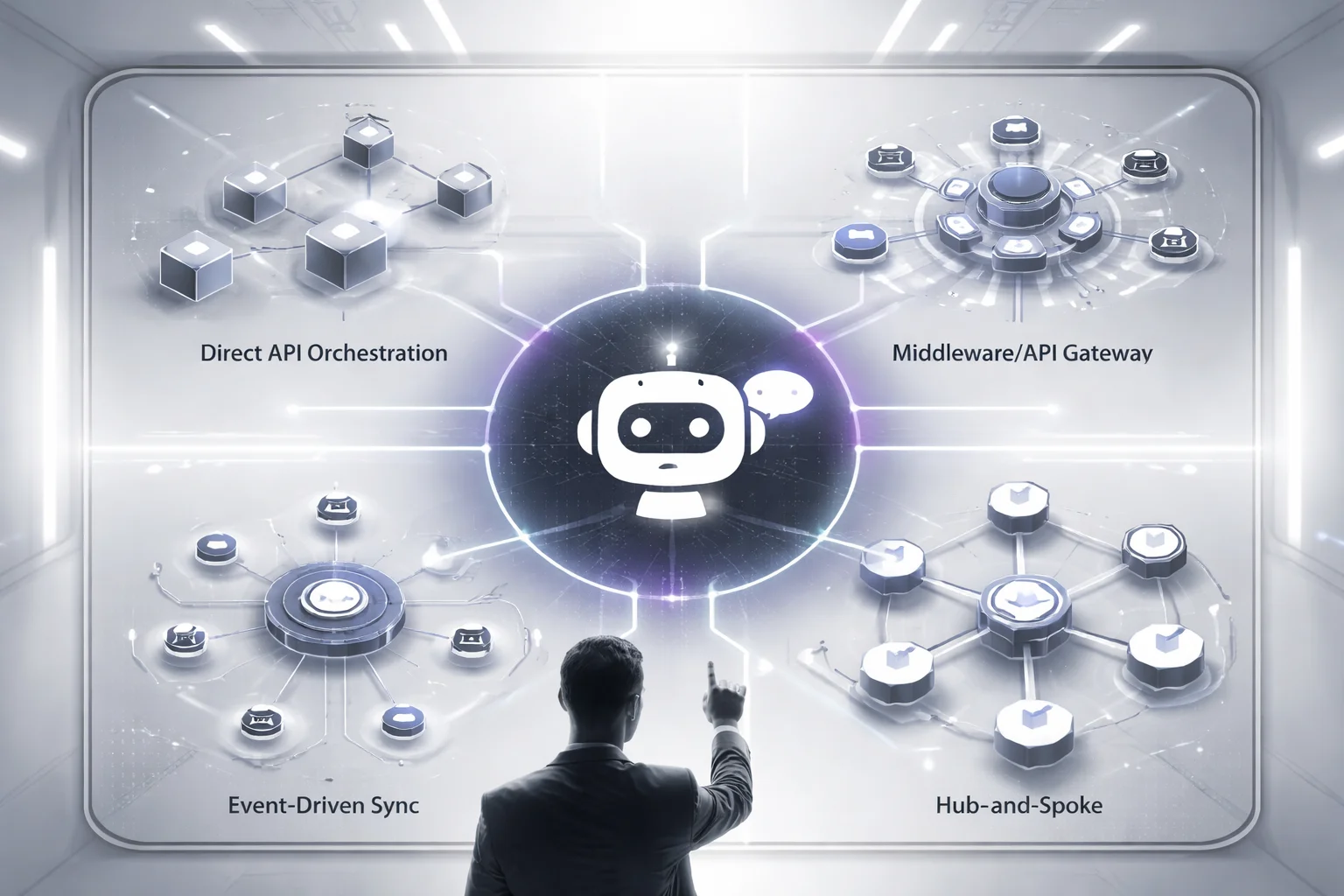
What that number should mean to you isn’t “buy more chatbot software.” It means the real bet isn’t the chat interface at all. It’s the plumbing behind it. Your bot has to pull customer records from Salesforce, open tickets in ServiceNow, read order data from SAP, maybe check identity through Okta, maybe touch Workday for HR workflows. That’s the moment this stops being a cute front-end project and starts becoming infrastructure with consequences.
I think teams get burned because they mistake early momentum for architectural health. A demo works. Leadership claps. Somebody wires up a few connectors and calls it progress. Then six months later an upstream API payload changes, nobody notices in staging, and now refund requests fail only on Tuesdays after 2 p.m. because one field came back null and the bot flow wasn’t built to survive it. I’ve seen versions of that mess before.
Direct API orchestration
Fast now. Pain later. This pattern is simple: the bot calls systems like Salesforce, ServiceNow, or SAP directly through APIs, gets data back, answers the user, or triggers an action.
For a narrow use case, it can be exactly right. Say your bot only checks order status from one commerce system and maybe confirms account details from Salesforce. Fine. Reads are quick because there’s no extra hop in the middle. That’s the appeal.
The trouble starts when “just one more integration” keeps happening. Two systems becomes five. Five becomes eight. Every API change hits bot logic directly. Security gets uglier too. If you care about enterprise chatbot security, direct access increases your blast radius unless permissions are locked down hard with least privilege and narrow scopes. A bot that can talk broadly across business systems is convenient right up until it isn’t.
Middleware or API gateway pattern
This is usually the sane default. Put a middleware layer between the chatbot and your systems of record.
Now the bot talks to one boundary instead of seven different applications with seven different moods. Authentication lives there. Logging lives there. Rate limiting lives there. Payload transformation lives there too. If Workday or another HR API changes its response structure, you patch one service instead of hunting through bot flows and integration code spread across multiple teams.
Yes, latency is a bit higher than direct calls. Usually worth it. Reliability and maintainability tend to improve enough that most enterprise chatbot solutions should start here unless there’s a really good reason not to.
The version I like is boring in exactly the right way: one internal gateway handles auth tokens, request shaping, audit logs, and fallback responses across five backend apps while the conversation team keeps updating intents and flows without reopening every integration ticket each sprint. Boring wins production fights.
Event-driven sync
Use this when live system waits are what’s killing you. In an event-driven architecture, webhooks fire, downstream services react asynchronously, and the bot reads synchronized state instead of pestering three systems during an active conversation.
This works especially well for approvals, shipping updates, status changes, and broader data synchronization for chatbots. If information can be pushed as events instead of fetched every single time a user asks for it, read latency can be excellent because the state is already available when the conversation happens.
You also get reliability gains if queues and retries are in place. But let’s not pretend this pattern is free money. Debugging gets harder fast, especially once microservices show up and nobody agrees which service dropped the event or whether it was processed twice. Great pattern. Messy failure modes.
Hub-and-spoke integration
This is the long game for sprawling enterprise environments. A central hub connects the bot to many business systems through managed adapters.
If your environment already includes HRIS platforms, ERP systems, CRM tools, identity providers, and older internal software that somehow still runs payroll-adjacent logic from 2014, this setup starts to earn its keep. It takes longer to design well. I’d still argue it often wins in ugly estates because change stays concentrated at the hub instead of bouncing through everything else every time a vendor tweaks an interface or an internal team retires a service.
For heavy systems of record integration, that containment matters more than elegance.
The advice here isn’t complicated even if the implementation can be: start middleware-first for your chatbot integration architecture. Add event-driven flows where resilience matters more than live freshness. Keep direct API calls tightly bounded to specific actions that won’t sprawl out of control. If your stack already looks like app sprawl with budget meetings attached, treat architecture as governance early and read Secure Internal Chatbot Development Enterprise.
Customers.ai says chatbots can increase conversions by 50% or more. Sure, that happens sometimes. Only if the plumbing holds under real traffic, real changes, real humans doing weird things at 4:47 p.m. on a Friday. So what are you building next — a chatbot demo, or something people will still trust after integration number seven?
How Chatbots Connect to Systems of Record
Thursday, 4:47 p.m. Support was buried. Finance had basically vanished for the day. A team lead typed, “escalate this refund case and notify finance,” and the bot answered like it had everything under control. Clean wording. Confident tone. Total dead end. It could read the CRM note, sure. It couldn’t update the ticket in ServiceNow. It couldn’t push anything into SAP or NetSuite. Finance never got the alert.
That’s the whole problem in one ugly little scene.
Work doesn’t happen inside the chatbot window. It happens in systems of record.
People love to talk about polished interfaces and better prompts and how the bot sounds “natural.” I think that’s overrated if the thing can’t actually operate inside the business. A chatbot that can’t connect to Salesforce, SAP, NetSuite, ServiceNow, Jira, Workday, your knowledge base, and sometimes your warehouse isn’t doing operations. It’s doing theater.
Hiver gets this right: tying chatbots into CRM, ERP, and HR systems isn’t some nice extra you add later if budget survives. It’s part of the design. Otherwise you keep the same silos and just give them a chat interface. A sales bot should pull account history from Salesforce before drafting a reply. A support bot should open and update incidents in ServiceNow or Jira so agents don’t waste two minutes retyping details they already gave once. An HR bot should check PTO balances in Workday or another HRIS and stay nowhere near payroll fields it doesn’t need.
Permissions are where teams usually get reckless.
Read access? One category. Write access? Different beast entirely.
Read access lets a bot answer order-status questions, summarize a case from Salesforce, pull policy text from a knowledge base, or guide a new hire through onboarding steps in Workday. Write access means the bot can create tickets, edit customer records, submit leave requests, trigger approval chains, or log finance actions tied to actual money. Same interface. Much higher stakes.
Keep read access broad only when your data classification says it’s safe. Keep write access narrow. Painfully narrow. I’ve seen teams hand out write scopes on a Wednesday because leadership wanted a slick Friday demo. Bad call. One mistaken field update across 12,000 customer records and suddenly everyone discovers they care deeply about governance.
Use APIs through a middleware layer. Don’t bolt rules onto every system one by one like you’re patching leaks with tape at midnight. Put authentication rules, logging, rate limits, field restrictions, and approval logic in one place so policy gets enforced once instead of rebuilt six different ways across vendor APIs and internal services.
Ownership matters too, and people forget that fast once employees start living in chat all day.
The chatbot isn’t where truth should live.
Your CRM owns customer records. Salesforce is still Salesforce whether the request starts in chat or not. Your ERP owns finance and inventory truth; that’s SAP or NetSuite territory. Your HRIS owns employee data; think Workday. Your knowledge base owns approved documentation. Your warehouse exists for reporting and analytics, and in most cases it shouldn’t be accepting live transactional writes from a helpful-sounding bot that got overconfident.
This is also why those dry technical terms stop sounding dry once something breaks: systems of record integration, webhooks, event-driven architecture. Not buzzwords. Survival tools. I’d argue events beat polling almost every time for this stuff because polling is how you end up hammering an API every 30 seconds just to catch one status change that should’ve been pushed instantly at 2:13 p.m., logged once, and synced cleanly everywhere else. That’s what better data synchronization for chatbots looks like in practice.
Security is wrapped around all of it whether people want to admit that or not.
If you’re deciding who gets write access, what gets logged, which changes need approval, and whether your audit trail still makes sense three months later during an internal review, you’re already making enterprise chatbot security decisions. If you want that piece unpacked further, read enterprise chatbot development security governance.
Master of Code points to numbers executives love: chatbots can cut client costs by up to 30% and handle 80% of FAQs. Fine. Useful even. But those numbers don’t mean much if the bot answers beautifully and then stalls the second someone asks it to take action inside Jira, ServiceNow, Salesforce, Workday, SAP, or NetSuite.
The real payoff shows up after the integration work is done properly: safe read access where it belongs, tightly controlled write paths where they’re justified, clear ownership across CRM, ERP, HRIS, ticketing systems, knowledge sources, and event flows that keep records current without turning your stack into chaos.
That’s when the bot stops being decoration.
It becomes an execution layer inside the business.
Data Synchronization Approaches for Integrated Chatbots
Hot take: most chatbot failures aren't language problems. They're sync problems with better marketing.

I've seen a bot sound polished, helpful, even weirdly confident — and still make a mess because two systems disagreed by a few minutes. In one support queue, the bot read “refund approved” straight from the CRM in real time, while finance was staring at a separate system where the same case was still on hold because its refresh lagged. Support had one version. Finance had another. The customer got both. That's how you burn an afternoon and half your team's credibility.
I think teams get this wrong because they treat data sync like plumbing. Hidden pipes. Somebody else's problem. Then they ship an enterprise chatbot integration that answers fast and answers wrong, which is worse than being slow.
The question that fixed it wasn't “what's easiest to build?” It was uglier than that: how dangerous is stale data for this field, in this workflow, for this user?
That's the whole game. Match the sync method to business risk, not engineering convenience.
Read live when the answer can trigger action
If a fact changes quickly or causes someone to do something, pull it live. Order status. Entitlement checks. Ticket state. Approval status. Those should come from the source system through API integration, usually with a middleware layer in front handling auth, retries, and rate limits before things get expensive or embarrassing.
If your bot is creating or updating tickets in ServiceNow, or pulling active case context from Salesforce, freshness matters more than shaving off 300 milliseconds. Sprinklr says much the same in practical terms: enterprise bots connect to CRM, ticketing, helpdesk, and knowledge systems so work can keep moving and handoffs to human agents don't break. That only works if the bot is looking at current data instead of yesterday's leftovers.
Cache the stuff people hammer all day
Not every answer deserves a live API call. Policy docs. Product metadata. Office locations. Approved knowledge snippets. People ask for that stuff constantly, and most of it doesn't change minute to minute. A replica store keeps latency down and stops upstream systems from taking unnecessary hits.
This is where teams get lazy. A five-minute TTL might be totally fine for a knowledge article index. It's reckless for account balance data. I'd argue every cached field needs three boring things written down somewhere nobody wants to maintain: an owner, a refresh interval, and an expiration rule. That's what real data synchronization for chatbots looks like — not vibes, not “we'll revisit it later,” not a Confluence page last touched in March 2023.
Stop polling like it's 2014
If the source system already knows when something changed, let it say so. A ticket closes. An HR request gets approved. A shipment flips to delivered. That's a job for webhooks, event-driven architecture, and sometimes microservices, not endless checking just because polling feels familiar.
I’ve watched teams poll every few seconds and then act surprised when they hit API limits or run up costs for no good reason. Push events are cleaner for state changes because the bot gets notified when something actually happens instead of repeatedly asking if anything happened yet.
Copy less sensitive data than you think you need
Some records shouldn't be replicated across half your stack just because it's possible. Payroll data. Medical details. Legal files. For those cases, just-in-time retrieval or partial-field sync with aggressive filtering is usually safer. Part architecture decision, part enterprise chatbot security, no escaping either one.
If two systems disagree, trust the system of record first. If a source goes down, say that plainly. If policy allows last verified data, label it as such; if not, route the user to a human callback path instead of bluffing through an answer and hoping nobody notices.
Workativ cites Accenture saying 56% believe conversational bots are disrupting the industry. Fine. I'd say the bots that survive aren't the flashy ones — they're the ones with dull rules about freshness windows, conflict handling, and failure states written before scale exposes every shortcut. If you want more on that control layer, look at enterprise chatbot development security governance. Strange thing is, users rarely thank you for good synchronization. They only notice when your bot starts running on hope — so which fields still are?
Enterprise Authentication Patterns for Chatbot Security
Who, exactly, is your chatbot at 2:14 p.m. on a Tuesday when it opens a Salesforce customer record, updates a ServiceNow incident, and pulls something sensitive from an HR system?
People love to talk about connections first. Salesforce. ServiceNow. Slack. Confluence. HR platforms. CRMs. Ticketing tools. Fair enough. Chitika says buyers in 2026 are judging enterprise chatbot platforms on how deep those integrations go across CRM, helpdesk, collaboration, and knowledge systems. That's real buying behavior.
Demos still dodge the nasty part. The bot answers neatly from a knowledge base, maybe runs RAG over approved internal docs, everybody nods, nobody asks what identity it presents once it stops summarizing policy pages and starts touching APIs that can change records.
The pressure makes teams do stupid things. Workativ, citing Accenture, says 43% report their competitors are already implementing conversational bot technology. I've seen how that movie ends: quarter-end deadline, one shared admin credential dropped in for "phase one," six weeks later security asks who changed a ticket or viewed a record and the room goes quiet.
It's identity. That's the answer. Not the bot's name in the sidebar. Not the tone settings. The identity it carries inside every connected system.
The safest default is boring, and I think boring wins here. Use enterprise SSO for employee sign-in. Usually that's SAML or OpenID Connect. User authenticates once, the bot operates inside a trusted session boundary, nobody has to fake sessions or pass around credentials like it's 2014.
User actions should run through delegated OAuth 2.0 access. This is where teams get lazy because delegated access feels slower than pasting in a shared token and calling it progress. Bad trade. If Maria can view only her team's open cases in Salesforce and has no business anywhere near payroll data, then the bot should inherit exactly that level of access in Salesforce or ServiceNow. Same slice. Nothing extra. No "temporary" admin scope that somehow survives three audits.
Service accounts aren't evil. They're just overused.
Keep them for background work: nightly data sync jobs for chatbots, webhook processing, middleware moving events between microservices in an event-driven setup. One job. One purpose. Minimal rights. I've watched broad service accounts turn into the office master key in less than 90 days because everybody needed a shortcut and nobody wanted ownership.
Authorization matters more than login polish. A slick sign-in screen doesn't save you if access control behind it is loose. Use role-based access control (RBAC). Tie roles to actual business functions, not vague labels somebody made up during implementation. Enforce least privilege across every hop in the chatbot integration architecture and every path into systems of record.
Audit logs get ugly fast when identity doesn't carry cleanly across systems. Then you've got fiction with timestamps.
You need logs that show user identity, delegated scopes, service-account actions, timestamps, request targets, and approval steps. If a chatbot updated a ServiceNow incident at 9:07 a.m., your team should be able to prove whether it acted on behalf of Jordan in IT operations or under a tightly scoped background account attached to a webhook workflow.
A bot with deep access and weak identity controls isn't impressive. It's dangerous.
I’d argue this is the test that matters: if you can't explain who the bot is in each system, what it's allowed to do there, and how you'll prove it later, your enterprise chatbot security isn't ready.
If you're fixing those controls now, read this next: Secure Internal Chatbot Development Enterprise.
Security, Compliance, and Governance for Integrated Chatbots
A team I worked with once celebrated too early. Pen test passed. SSO was wired up. Role-based access looked clean on the slide. Encryption at rest, encryption in transit, all checked off like they were heading into a board meeting with confetti cannons.
Then legal asked three painfully ordinary questions: where are the conversation logs with customer PII stored, how long are they kept, and who approved that retention policy? Nothing. No answer. Just open laptops, spinning fans, and that awful moment where everyone realizes the launch plan was built around the front door while the bot had already been given a master key.
That’s the part people miss. Enterprise chatbot security isn’t mainly about access controls, even though teams love obsessing over SSO and permissions because those are visible and easy to demo. The real problem shows up later: what the bot can read, what it keeps, what it writes back into core systems, and whether you can prove any of it after the fact to security, operations, legal, or the board.
I think this is where a lot of smart teams get sloppy. Easy access feels productive. It usually isn’t. If a bot only needs order status and account tier, don’t hand it the full customer profile from Salesforce or another CRM just because the connector lets you. During enterprise chatbot integration and systems of record integration, route requests through a middleware layer or tightly scoped API integration service that removes anything unnecessary before the model ever sees it.
That’s lesson one: narrow what the bot can read.
Lesson two gets ignored even more. Don’t trust write-back just because the chat response sounds polished. If the chatbot can trigger employee changes in Workday, approve finance actions, or update sensitive records, those actions need approval flows before anything lands in production systems. A smooth answer in chat doesn’t earn a free pass around business controls. It just makes bad decisions look tidy.
Then there’s logging, which everybody calls boring right up until an auditor asks for proof. You need audit trails that capture user identity, delegated permissions, prompts tied to actions, approval events, webhook calls, and downstream updates across microservices. If your event-driven architecture kicks off an HR workflow or flips a support ticket status at 2:14 p.m., those events need timestamps, correlation IDs, and retention rules compliance can sign without gritting their teeth.
Here’s the framework I’d use because it’s simple enough to survive contact with reality: read small, write slowly, log everything, keep less.
Read small: only expose the minimum data needed for the task.Write slowly: put approvals in front of changes to HR, finance, and sensitive records.Log everything: identities, prompts, webhooks, approvals, downstream system updates.Keep less: transcripts and logs should follow policy, not habit.
Retention is where teams create their own future mess. They keep transcripts forever because storage looks cheap in month one. It doesn’t feel cheap once discovery starts. Keep records only as long as policy requires. Redact or tokenize sensitive fields where you can. Separate operational logs from training data unless someone explicitly approved reuse. That’s how data synchronization for chatbots stays useful instead of becoming evidence in a meeting nobody wants to attend.
NiCE is right about one thing: integration is what turns chatbots from basic tools into strategic platforms connected to real-time data and workflow triggers. Sure. But strategy without controls gets expensive fast. Workativ, citing Accenture, says 57% believe conversational bots can deliver strong ROI with minimal effort. I’d argue “minimal effort” is exactly how you end up doing cleanup by quarter two.
If you’re evaluating enterprise chatbot solutions, ignore the prettiest demo for a minute. Ask harder questions. Can it filter data before model access? Can workflows pause for approval? Are webhooks auditable? Are retention policies enforced instead of implied? Is governance built into every layer from day one? That’s the logic behind Buzzi AI’s integration-first approach: systems you can defend with evidence instead of hand-waving. Because if your bot touches customer data, finance actions, or HR records, what are you actually going to show the board when they ask how it’s governed?
FAQ: Enterprise Chatbot Solutions
What are enterprise chatbot solutions?
Enterprise chatbot solutions are chat systems built for large organizations, not just simple website Q&A. They connect to business tools like CRM, ERP, HRIS, ITSM, and knowledge bases so they can answer questions, trigger workflows, and complete tasks across departments.
What is an integration-first approach to enterprise chatbot integration?
An integration-first approach means you design the bot around your systems, data, and controls before you obsess over conversation polish. In practice, that means mapping APIs, systems of record integration, identity, permissions, and approval flows early, because that's what determines whether the bot can actually do useful work.
How do enterprise chatbots integrate with existing systems?
Most teams connect chatbots through API integration, webhooks, middleware layer tools, or microservices that sit between the bot and business applications. The right setup depends on your stack, but the goal is always the same: let the bot read trusted data, trigger actions, and return responses without creating another silo.
Why do enterprise chatbots fail without integration?
Because a chatbot that can't reach live business data is usually just a nicer search box. It may answer FAQs, but it won't check order status in Salesforce, open a ticket in ServiceNow, update a record in Workday, or pull account details from your systems of record, and that's where enterprise value usually lives.
Can enterprise chatbots connect to systems of record?
Yes, and they usually should if you want the bot to do more than recite documentation. Common targets include CRM, ERP, HRIS, ITSM, identity systems, and data warehouses, but each connection needs clear rules for read access, write actions, validation, and human escalation.
Which chatbot integration architecture works best: API, event-driven, or middleware?
There's no single winner. Direct APIs work well for simple, low-latency actions, event-driven architecture fits workflows that depend on message queues and async updates, and a middleware layer helps when you need to normalize data, enforce policy, or connect older systems that weren't built cleanly in the first place.
How should data synchronization for chatbots be handled?
Data synchronization for chatbots should be based on how fresh the answer needs to be. For high-risk or fast-changing data, pull it in real time through APIs or events; for lower-risk use cases, ETL and ELT pipelines, scheduled syncs, and cached indexes can work if you track update times and handle conflicts carefully.
What authentication patterns are used for enterprise chatbot security?
The usual patterns are single sign-on (SSO), OAuth 2.0 for delegated access, SAML authentication for enterprise identity environments, and service-to-service tokens for backend actions. Good enterprise chatbot security also separates user identity from system credentials so the bot doesn't act with broad, invisible access.
Does an enterprise chatbot need SSO and RBAC?
In most enterprise environments, yes. SSO makes access manageable for employees and partners, while role-based access control (RBAC) makes sure the chatbot only shows data and actions each user is allowed to see, which matters a lot once the bot touches finance, HR, customer records, or internal operations.
How do you ensure compliance and governance for integrated chatbots?
You set controls before rollout, not after the first incident. That usually means least privilege access, audit logging, approval workflows for sensitive actions, retention rules, policy enforcement, and regular reviews against requirements like SOC 2 compliance, GDPR, or HIPAA depending on the data your chatbot handles.